Downloading a game/app
1. Download the lua file [What are the lua files for?]
- Open openlua.cloud
- Search for the game/app you want to add to your Steam Library for free
- Click Download and complete the ad
- After completing the ad, make sure to read any popups that might've appeared.
Subscribe to openlua.cloud Plus for only 5€/month to remove all ads!
To subscribe or view all perks:
- Visit openlua.cloud
- Click the Discord login button in the top right corner
- Once logged in, click your username and select Subscribe to Plus
2. Open SteamTools and add the game/app
If you haven't already, open SteamTools and a gray floating Steam icon should appear.
If the floating icon did not appear
A white Steam icon should've appeared in your tray. Right click it, and select Display Floating Window.
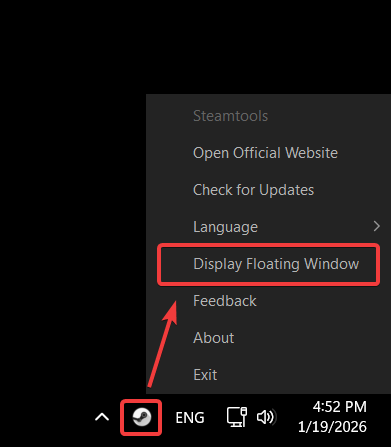
Can't see it? Make sure to check the Hidden icons menu too:

After that, drag the lua file you've downloaded onto the floating Steam icon. Then, restart Steam through SteamTools by right clicking the floating Steam icon and selecting Restart Steam.
If you've run the fix-st script before, dragging the file onto the floating icon won't work. Move it into the folder below instead:
C:\Program Files (x86)\Steam\config\lua
Steam picks it up right away, so you don't have to restart it.
Congrats!
If you've followed all of the steps correctly, you should now have the game/app in your Steam Library, available to download for free.
Check out the Troubleshooting section