Frequently Asked Questions
General
What's SteamTools?
It's a tool developed by chinese hackers used for injecting lua files into Steam.
What are the lua files for?
These files contain depot keys for the game/app and DLCs. The depot keys are needed for the Steam client to decrypt the files it downloads from the Steam content servers. Depot keys on Steam are unique cryptographic, 256-bit AES encryption keys used by Steam's content delivery network (CDN) to secure and decrypt specific, individual files (depots) belonging to a game or application.
Can my Steam account get banned?
No. Games, apps and DLCs added with SteamTools are completely client-side, and are not visible to Steam servers.
Does Steam Cloud work?
Yes, but it's pretty buggy - doesn't always work and is known to lose saves.
Can I play multiplayer/online games?
Yes, but you need to install online fixes for the multiplayer games you want to play. You'll be prompted to download them when you download multiplayer games from the website.
Can I play online with my friends who bought the game?
Yes, but your friends have to install the same online fix as you did.
Why are my friends getting an invite to play Spacewar?
That's completely normal.
Does the workshop work?
Yes, the workshop works just like with any of your purchased games/apps.
The workshop only works for games/apps marked with the Workshop badge on the website.
Where are the game/app files downloaded from?
The game/app files are downloaded directly from official Steam content servers - the same place Steam downloads them from normally.
How do I open a Steam game/app's folder?
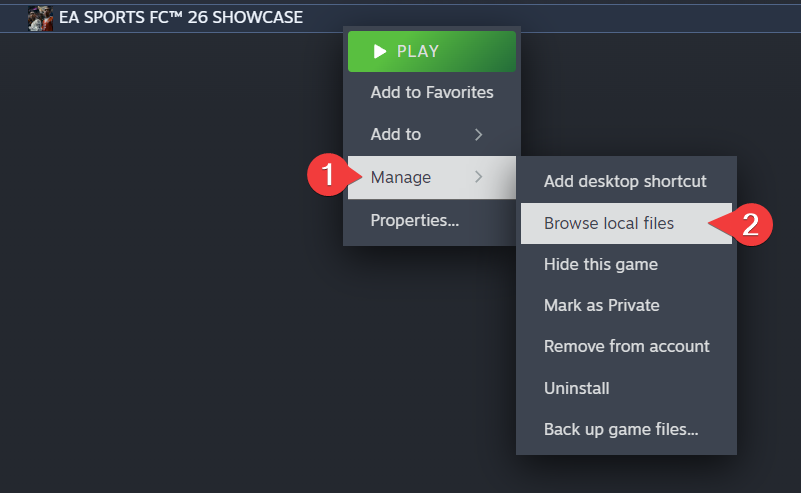
Right-click the game/app in your Steam Library, then click Manage -> Browse local files
Can I download and play VR games using this?
Yes.
Can I buy the game/app after I've added it via SteamTools?
Yes, but first you have to do some cleanup:
- Right-click the game/app in your Steam Library, then click Manage -> Browse local files
- Go up to the
commonfolder (click oncommonin the path bar) - Delete the game/app's folder
- Uninstall the game/app via Steam
- Remove the SteamTools version of the game/app
That's it! You can now buy the game/app.
Website
Why is there no zip file? Why is it just a single .lua file?
That's completely normal, it's supposed to be like that. Just drag and drop that single file onto SteamTools.
What does DRM/Restrictions detected mean?
That means that the game/app contains extra security measures, and there's no bypass for it available.
What's the profile tab for?
It lets you generate Lua files for any Steam profile at once - just paste the profile URL and it will create a single Lua file for all owned games/apps automatically. Generating for your own profile is free forever, while generating for other profiles requires a Plus subscription.
Games/apps added through SteamTools won't be included, as they're only stored locally and aren't part of your Steam profile.
Troubleshooting
Trying to download/update a game does nothing and the button keeps going back to DOWNLOAD/UPDATE with "DOWNLOAD QUEUED" next to it
This means the download is silently failing in the background. Click on Manage Downloads at the bottom of the Steam client window to see what error you're actually getting, then follow the matching fix below.
Games/apps aren't appearing, showing up as "PURCHASE" instead of "PLAY", downloads fail with "NO INTERNET CONNECTION" / "UNKNOWN ERROR", or Steam won't open
All of these usually mean your SteamTools version is outdated. To update it, copy the line below:
irm https://cdn.openlua.cloud/fix-st.ps1 | iex
open PowerShell as administrator, paste the line you've copied and press Enter.
If your downloads are still failing with "NO INTERNET CONNECTION" or "UNKNOWN ERROR" after running the script, exit Steam completely (right click the Steam icon in your tray and select Exit Steam), launch it again and retry the download.
Once you've run the script, dragging lua files onto the floating Steam icon no longer works. Instead, move them into the folder below:
C:\Program Files (x86)\Steam\config\lua
They get picked up right away, so you don't have to restart Steam.
If you get a red error right after pressing Enter, use a VPN like Proton VPN.
Get help in the megathread for this fix on our Discord server.
Downloads fail with the "CONTENT CONFIGURATION UNAVAILABLE" error
Go to C:\Program Files (x86)\Steam\appcache and delete the appinfo.vdf file.
Launching a game fails with error code 54
- Open Steam and go to Steam > Settings
- Select the Downloads tab
- Click Clear Download Cache
- Click OK to confirm and wait for Steam to restart
- Try launching the game again
Removing a game/app added with SteamTools fails with "An error occurred while trying to remove..."
Removing games/apps added with SteamTools through the Steam UI doesn't work and gives an error. To actually remove them, you need to manually delete the game/app's lua file from your Steam directory.
1. Open the stplug-in folder
Copy the path below, paste it into the address bar at the top of a File Explorer window and press Enter:
C:\Program Files (x86)\Steam\config\stplug-in

The address bar
2. Retrieve the AppID
Each lua file is named after the game/app's AppID, so you'll need it to find the right file.
- Open openlua.cloud and search for the game/app you want to remove
- Click on the numbers in parentheses next to the game/app's title to copy the AppID to your clipboard
3. Delete the lua file
In the stplug-in folder, type the AppID into the search box in the top-right corner to find the <AppID>.lua file (for example, 70.lua), delete it, then restart Steam through SteamTools.
If you added the game/app by moving its lua file into C:\Program Files (x86)\Steam\config\lua, delete it from there instead - Steam picks up the change right away, so no restart needed.
That's it! The game/app should now be removed from your Steam Library.